Dimensionality Reduction & PCA

Lecture 32

Dr. Eric Friedlander

College of Idaho
CSCI 2025 - Winter 2026

Dimensionality

The Problem with High Dimensions

  • Big Data can mean lots of observations (big \(n\)) or lots of variables (big \(p\)).
  • Big \(p\) Problems:
    • Visualization: Hard to plot > 3 dimensions.
    • Curse of Dimensionality:
      • Data becomes sparse.
      • Distance metrics (Euclidean) lose meaning.
      • Models can overfit.

Dimensionality Reduction

  • Goal phrasing 1: Reduce the number of columns, while losing as little information as possible
  • Goal phrasing 2: Extract lower-dimensional structure from our data
  • Analogy: file compression

Which One is Compressed?

Which One is Compressed?

1,330 KB

396 KB

Idea

  • We managed to:
    • Reduce file size by 70%
    • Not lose much information
    • Extract underlying structure (a duck)

Thinking about structure in tabular data

Underlying Structure

  • What dimension is our data in?
  • What is the underlying structure here?
  • What is the dimension of a plane?

Visualizing Plane

Thinking about structure in tabular data

Underlying Structure

  • What dimension is our data in?
  • What is the underlying structure here?
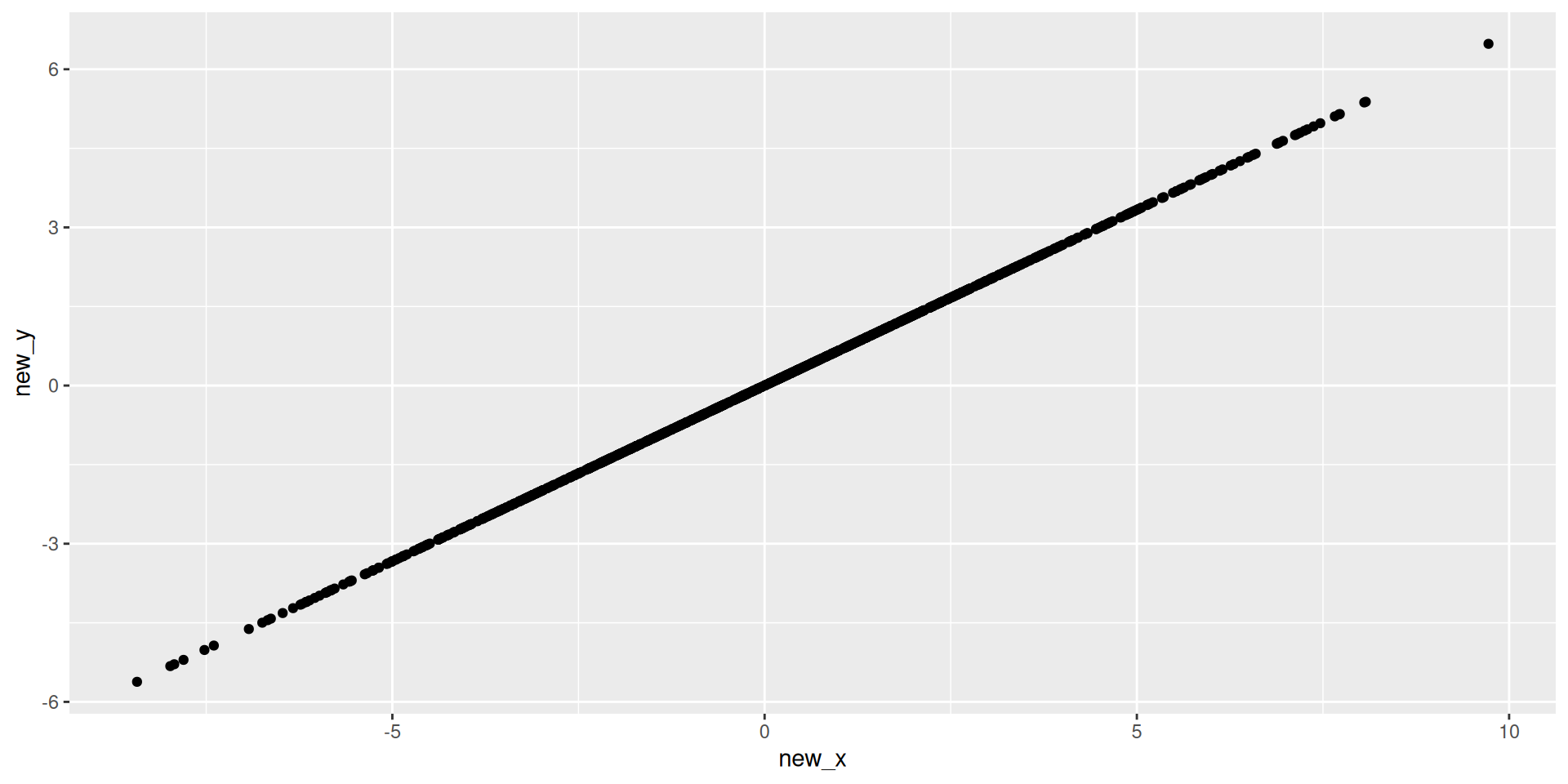
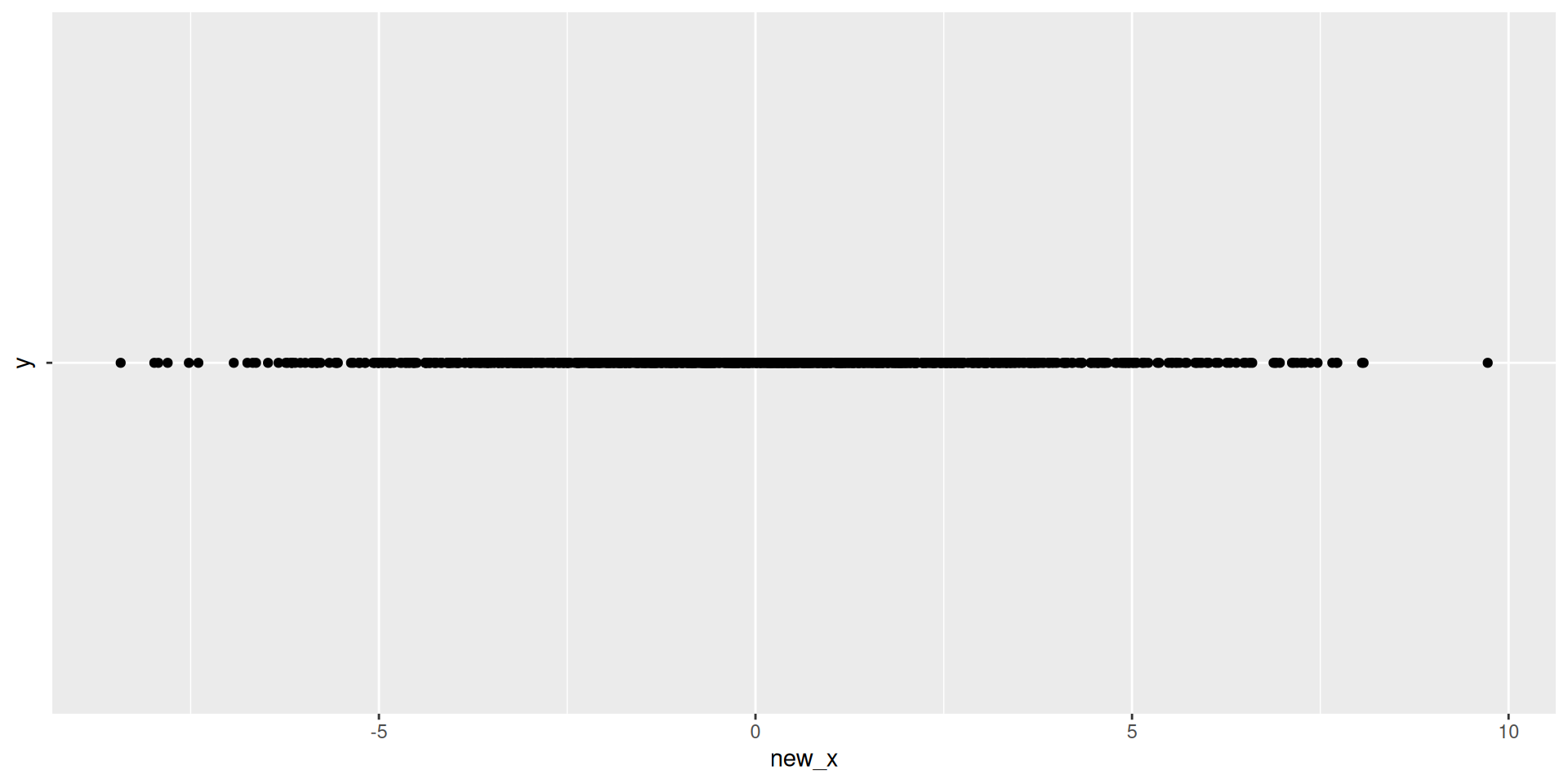
  • What is the dimension of a line?

Visualizing 2D

Visualizing 1D

Visualizing 1D Data
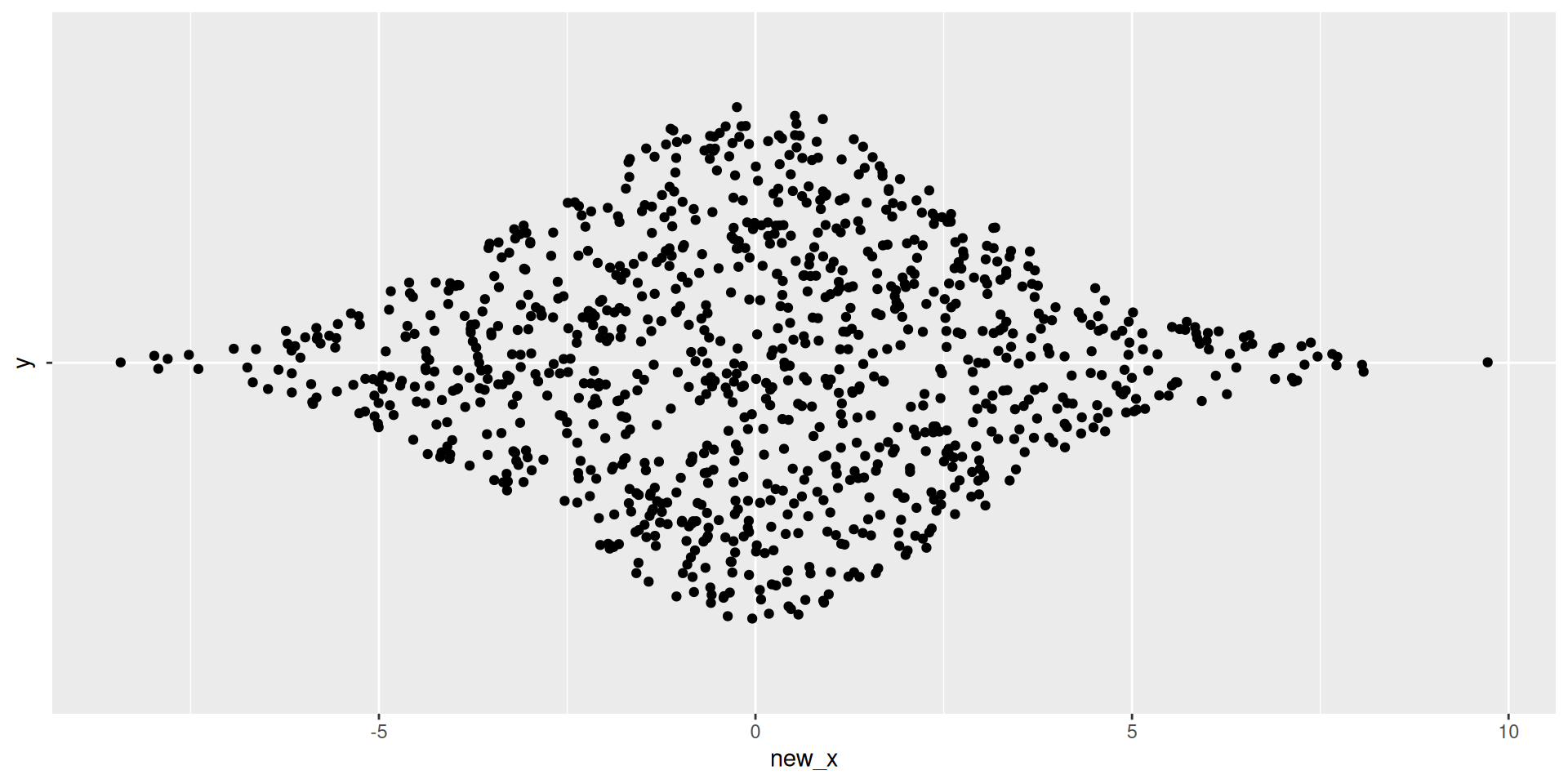
Thinking about structure in tabular data

Underlying Structure

  • What dimension is our data in?
  • What is the underlying structure here?
  • What is the dimension of a plane?

Visualizing Plane

Discussion

  • What’s the difference between the first two scenario’s and the third scenario?
    • How much have we reduced the dimension?
    • How much information have we lost?

Principal Component Analysis (PCA)

Vector’s and Projections

Basis Vectors and New Coordinates

  • Plane above: \(z = x + y\)
  • New Directions:
    • New Direction 1: \(\vec{d}_1 = \langle 1, 1, 2\rangle\)
    • New Direction 2: \(\vec{d}_2 = \langle 1, -1, 0\rangle\)
  • New data:
    • New \(x\): \(1\times x_{old} + 1\times y_{old} + 2\times z_{old}\)
    • New \(y\): \(1\times x_{old} - 1\times y_{old} + 0\times z_{old}\)
  • Note: Not quite correct, need to re-normalize

New Data

new_data <- data |> 
  mutate(new_x = x + y + 2*z,
         new_y = x - y,
         new_x = new_x/6, #re-normalizing
         new_y = new_y/2)

new_data |> head() |> kable()
x y z new_x new_y
-0.5604756 -0.9957987 -1.5562744 -0.7781372 0.2176615
-0.2301775 -1.0399550 -1.2701325 -0.6350663 0.4048888
1.5587083 -0.0179802 1.5407281 0.7703640 0.7883443
0.0705084 -0.1321751 -0.0616667 -0.0308334 0.1013418
0.1292877 -2.5493428 -2.4200550 -1.2100275 1.3393153
1.7150650 1.0405735 2.7556384 1.3778192 0.3372458

What’s actually happening

  • We are projecting each observation onto our new directions \(\vec{d}_1\) and \(\vec{d}_2\)
  • Visualization

Projecting our data

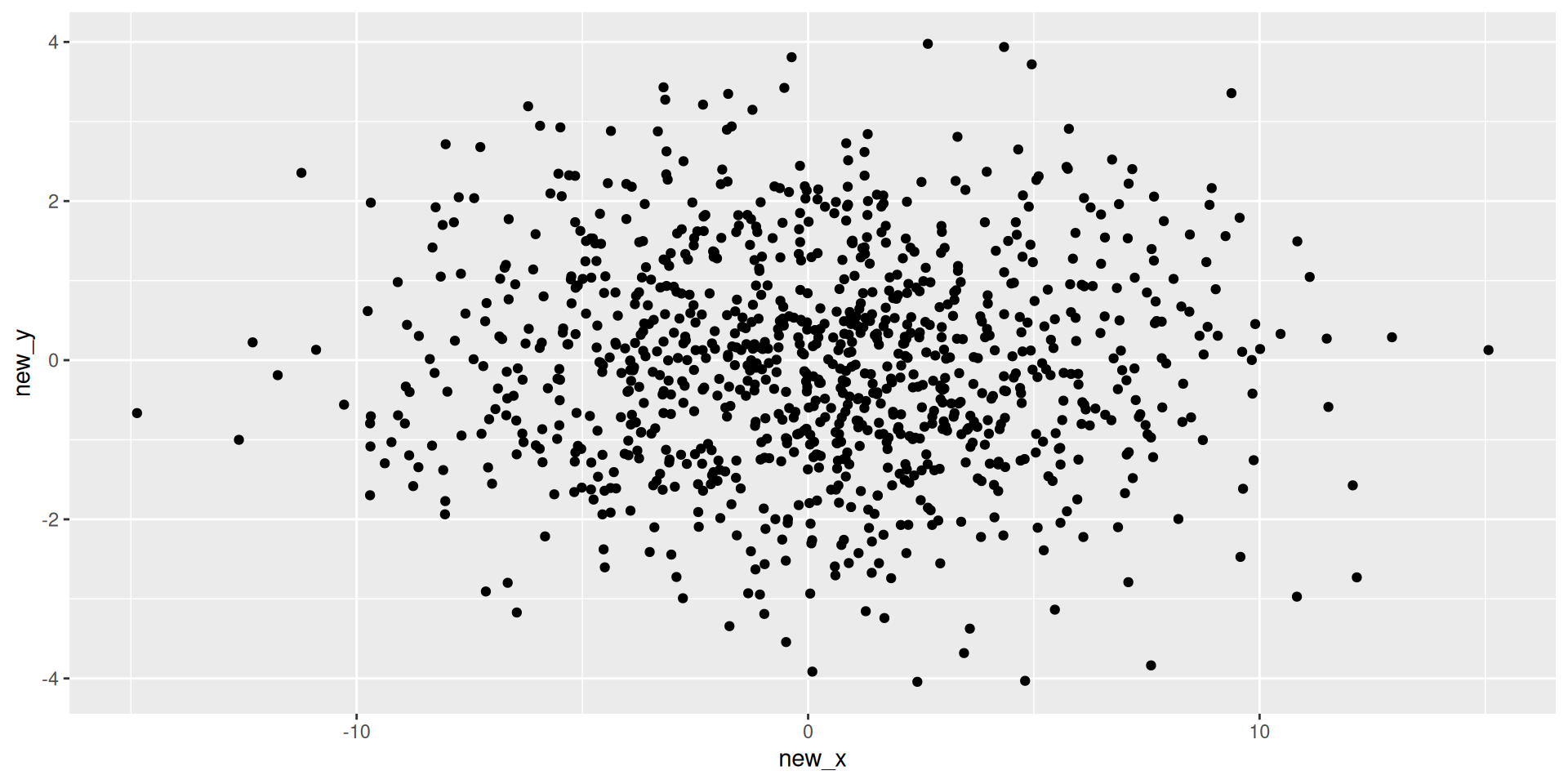
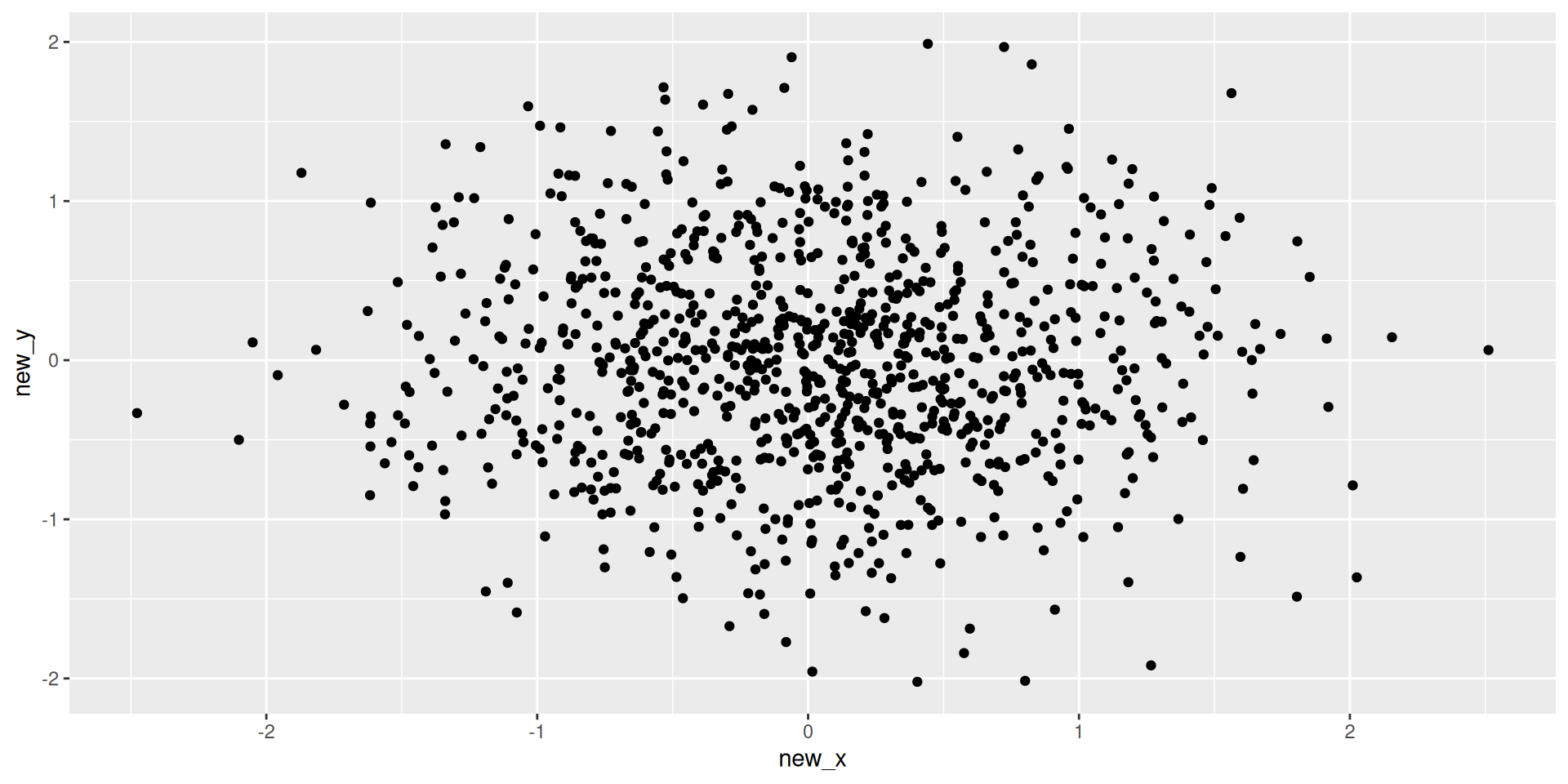
Plotting these

new_data |> 
  ggplot(aes(x = new_x, y = new_y)) +
           geom_point()

Principal Component Analysis (PCA)

PCA Vocabulary

  • Principal Component (PC1): direction in \(p\)-dimensional space (e.g. \(\langle 1, 1, 2\rangle\))
  • Scores: our new variables (e.g. \((-0.56\times 1 + -0.996\times 1 + -1.56\times 2)/6 = -0.778\))
  • Loadings: For direction above’
    • Loading on \(x\) is 1
    • Loading on \(y\) is 1
    • Loading on \(z\) is 2

Recall: Variance

  • What is variance?
  • Intuitively: what does variance measure?
  • Variance: \(\frac{1}{n-1}\sum_{i=1}^n(x_i - \bar{x})^2\)
    • Average of the squared distance from zero of each observation

Idea behind PCA

  • Select first PC so variance of scores is the maximum
  • Iteratively:
    • Select next PC so variance of scores is maximize AND new PC is orthogonal to all other PCs
  • What does orthogonal mean?

Easy Example

  • Exercise: What should the first and second PCs be?
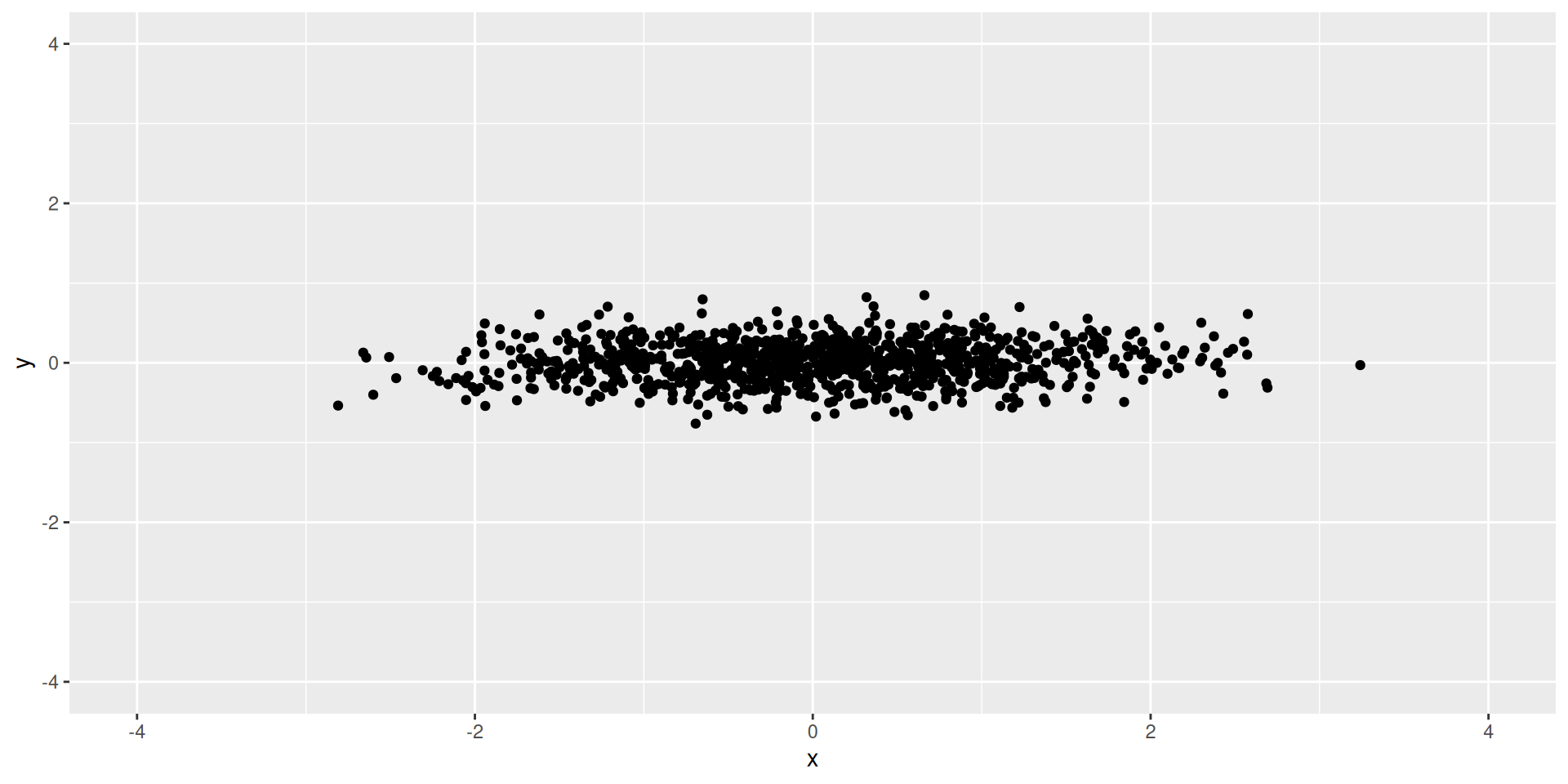
How much variance is explained by each of the PC’s?

var_exp <- easy_ex |> 
  mutate(PC1 = x,
         PC2 = y) |> 
  summarize(var1 = var(PC1), 
            var2 = var(PC2))

var_exp |> kable()
var1 var2
0.9834589 0.0637151

What proportion of variance is explained by each of the PC’s?

var_exp |> 
  pivot_longer(everything()) |> 
  mutate(proportion = value/sum(value)) |> 
  kable()
name value proportion
var1 0.9834589 0.9391552
var2 0.0637151 0.0608448
  • 93% of our variance (information) is contained in our first PC

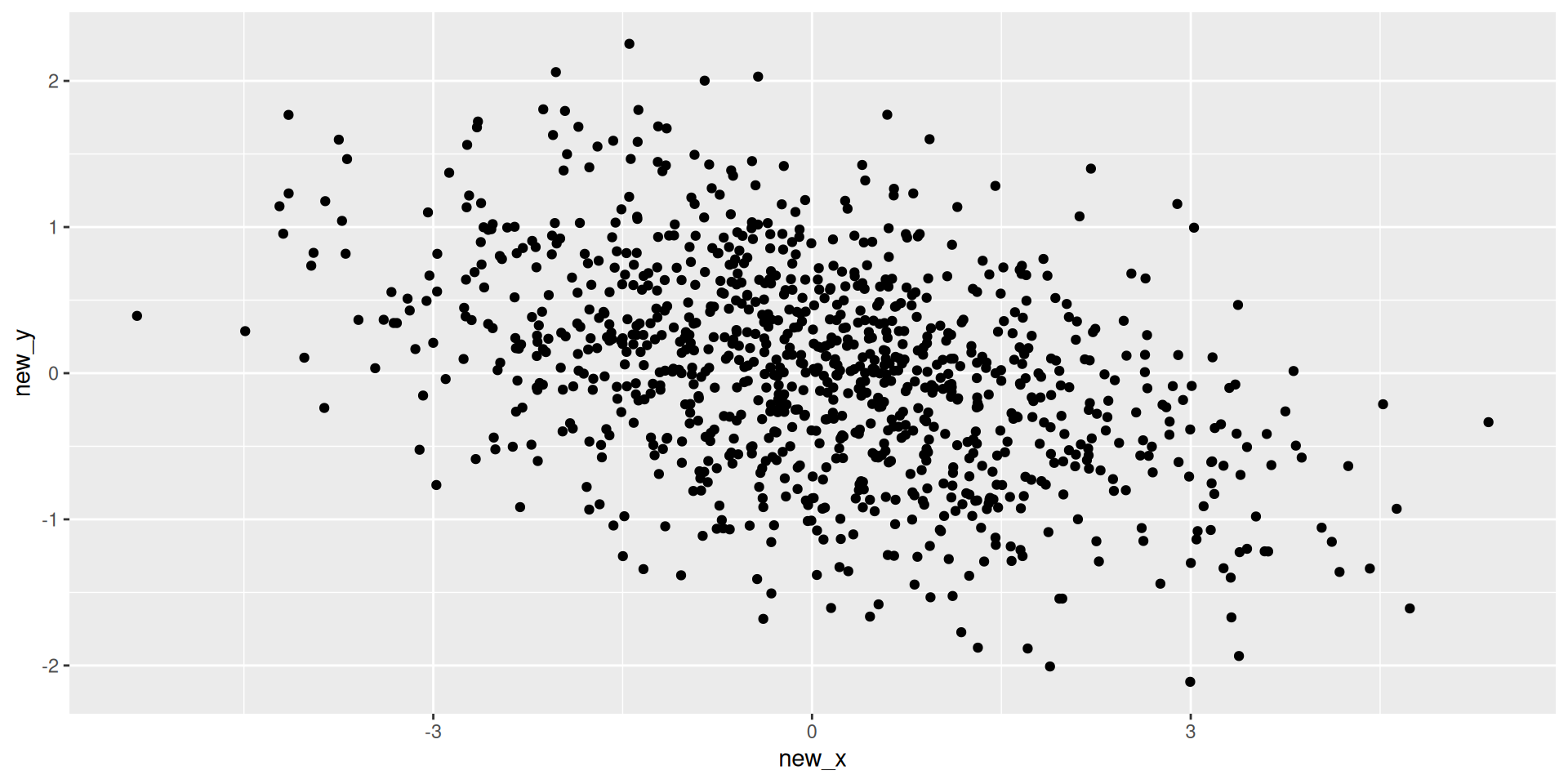
Harder Example

  • Exercise: What should the first and second PCs be?
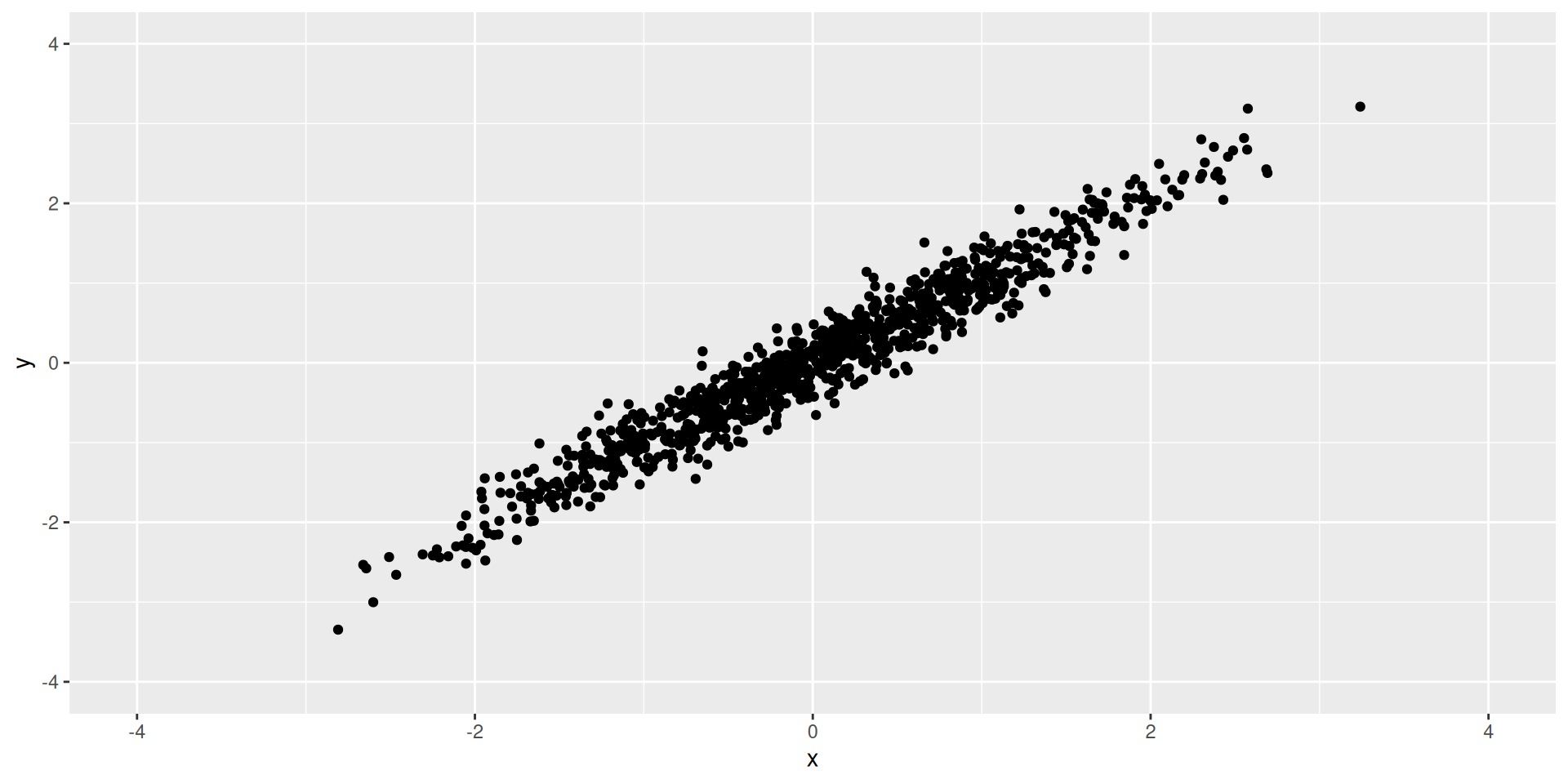
How much variance is explained by each of the PC’s?

var_exp <- harder_ex |> 
  mutate(PC1 = (x + y)/2,
         PC2 = (x-y)/2) |> 
  summarize(var1 = var(PC1), 
            var2 = var(PC2))

var_exp |> kable()
var1 var2
1.021035 0.0159288

Principal Component Analysis

Intuition

  • PCA finds new axes (Principal Components) that capture the maximum variance in the data.
  • PC1: Direction of maximum variance.
  • PC2: Orthogonal to PC1, next maximum variance.
  • We can project our data onto these 2-3 new axes to visualize it!

PCA with Recipes

  • step_pca(): Computes principal components.
  • Pre-requisites:
    • Numeric only: Use step_dummy() for categorical.
    • Scaled: Use step_normalize() (Variance depends on scale!).

Example: Palmer Penguins

  • Let’s visualize the 4 numeric body measurements in 2 dimensions.
Code
library(tidymodels)
library(palmerpenguins)
library(tidyverse)

# Define Recipe
pca_rec <- recipe(~ ., data = penguins) |>
  step_rm(year, sex, island) |>        # Remove non-measurements
  step_naomit(all_predictors()) |>
  step_normalize(all_numeric_predictors()) |>
  step_pca(all_numeric_predictors()) # Keep top 2 PCs

# Prep and Bake
pca_prep <- prep(pca_rec)
pca_data <- bake(pca_prep, new_data = NULL)

head(pca_data)
# A tibble: 6 × 5
  species   PC1      PC2     PC3    PC4
  <fct>   <dbl>    <dbl>   <dbl>  <dbl>
1 Adelie  -1.84 -0.0476   0.232   0.523
2 Adelie  -1.30  0.428    0.0295  0.402
3 Adelie  -1.37  0.154   -0.198  -0.527
4 Adelie  -1.88  0.00205  0.618  -0.478
5 Adelie  -1.91 -0.828    0.686  -0.207
6 Adelie  -1.76  0.351   -0.0276  0.504

Visualizing PCA

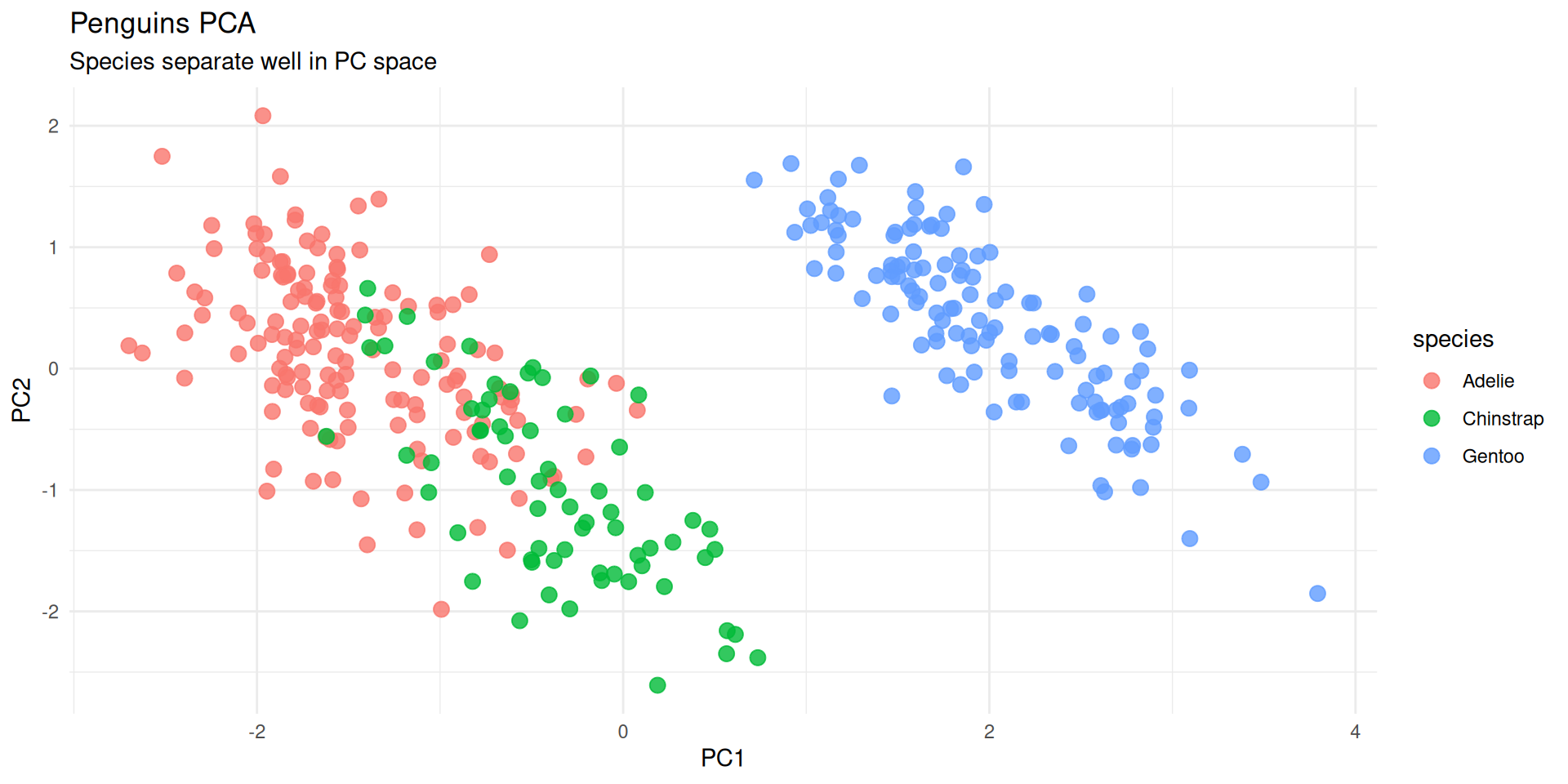
Scatterplot of PC1 vs PC2

  • The most common PCA plot.
  • Points close together are “similar” in the original high-dimensional space.
Code
# Since we removed 'species' in the recipe to avoid using it in PCA,
# we might want to bind it back for plotting coloring.
# A better workflow is to keep it as an ID/Role but not utilize it in step_pca.

pca_rec_2 <- recipe(species ~ ., data = penguins) |>
  step_rm(year, sex, island) |>
  step_naomit(all_predictors()) |>
  step_normalize(all_numeric_predictors()) |>
  step_pca(all_numeric_predictors(), num_comp = 2) 
  # Default behavior: step_pca ignores 'outcome' variables, which is handy!

pca_prep_2 <- prep(pca_rec_2)
pca_juice <- juice(pca_prep_2) # juice() is a shortcut for bake(prep, new_data=NULL)

ggplot(pca_juice, aes(x = PC1, y = PC2, color = species)) +
  geom_point(size = 3, alpha = 0.8) +
  theme_minimal() +
  labs(title = "Penguins PCA", subtitle = "Species separate well in PC space")
Loadings: What do the PCs mean?

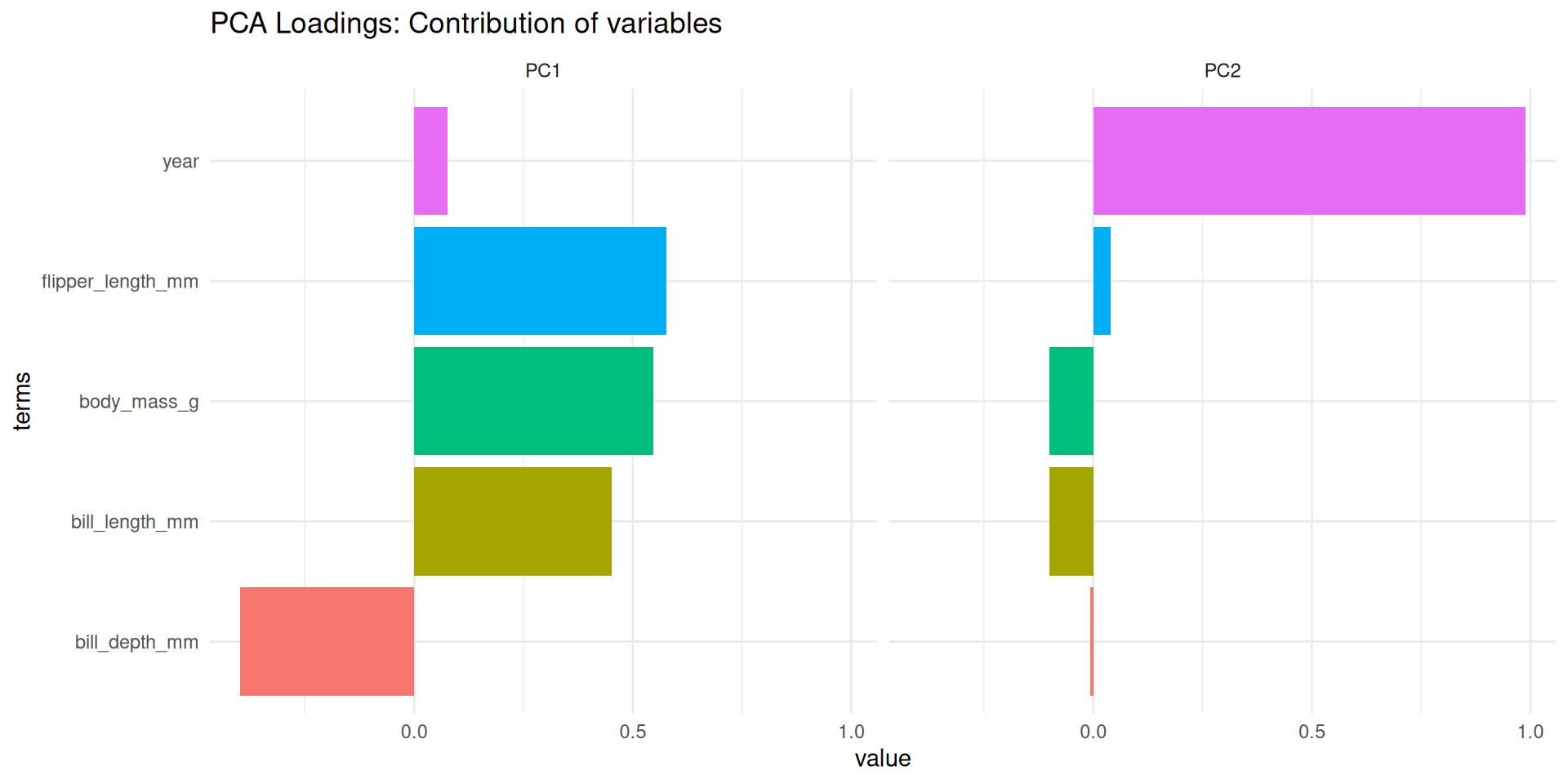
  • Loadings: The contribution of each original variable to the PC.
  • We can extract them from the prepped recipe using tidy().
Code
pca_comps <- tidy(pca_prep_2, number = 2, type = "coef") # number=2 refers to the step number index if unknown, typically easier to look up.
# Better way: ID the step
pca_rec_named <- recipe(species ~ ., data = penguins) |>
  step_naomit(all_predictors()) |>
  step_normalize(all_numeric_predictors()) |>
  step_pca(all_numeric_predictors(), id = "pca")

pca_prep_named <- prep(pca_rec_named)
pca_comps <- tidy(pca_prep_named, id = "pca")

pca_comps |>
  filter(component %in% c("PC1", "PC2")) |>
  ggplot(aes(x = value, y = terms, fill = terms)) +
  geom_col() +
  facet_wrap(~component) +
  theme_minimal() +
  theme(legend.position = "none") +
  labs(title = "PCA Loadings: Contribution of variables")
Scree Plot: How many PCs?

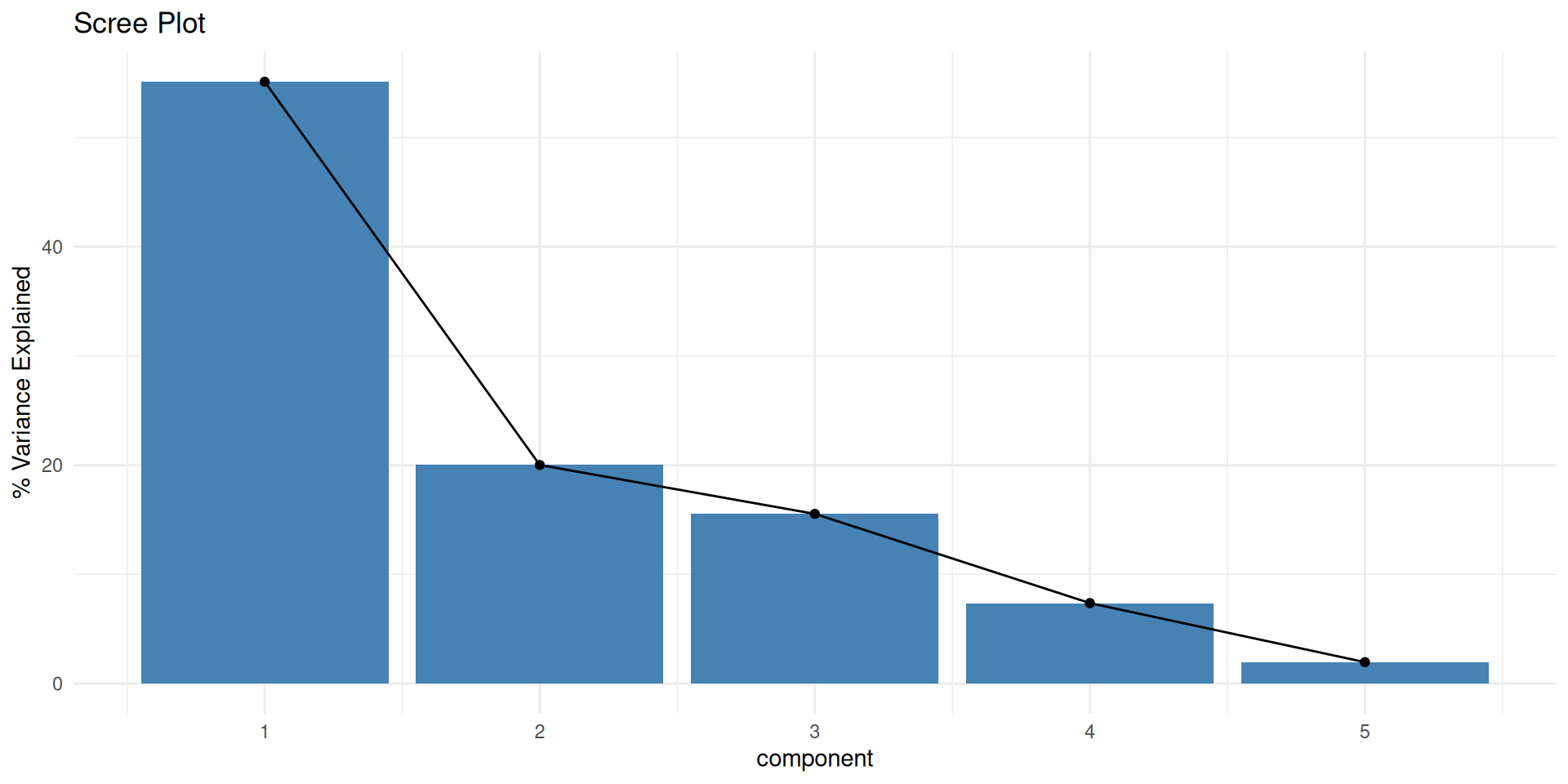
  • How much variance is explained by each component?
Code
# Extract variance explained
pca_var <- tidy(pca_prep_named, id = "pca", type = "variance")

pca_var |>
  filter(terms == "percent variance") |>
  ggplot(aes(x = component, y = value)) +
  geom_col(fill = "steelblue") +
  geom_line(group = 1) +
  geom_point() +
  labs(title = "Scree Plot", y = "% Variance Explained") +
  theme_minimal()

Wrap-Up

Recap

  • Dimensionality Reduction: Visualizing high-D data in 2D/3D.
  • Steps:
    1. step_normalize() (Crucial!)
    2. step_pca()
  • Visualization:
    • Score Plot: PC1 vs PC2 (Where are the data points?)
    • Loadings Plot: Terms contribution (What do the axes mean?)
    • Scree Plot: Variance explained (How much info is kept?)

Do Next

  1. Read Chapter 16: Dimensionality Reduction from Tidy Modeling with R.
  2. There’s NO recitation Gem for this textbook but I recommend creating your own and adding the textbook chapter and these slides.
  3. That’s it for tonight!