ggplot2 layers

Lecture 7

Dr. Eric Friedlander

College of Idaho
CSCI 2025 - Winter 2026

The layered grammar of graphics

Data: Flights from NYC in 2013

We will be using the nycflights13::flights dataset. This dataset contains information about all flights that departed from New York City (EWR, LGA, JFK) in 2013.

glimpse(flights)
Rows: 336,776
Columns: 19
$ year           <int> 2013, 2013, 2013, 2013, 2013, 2013, 2013, 2013, 2013, 2…
$ month          <int> 1, 1, 1, 1, 1, 1, 1, 1, 1, 1, 1, 1, 1, 1, 1, 1, 1, 1, 1…
$ day            <int> 1, 1, 1, 1, 1, 1, 1, 1, 1, 1, 1, 1, 1, 1, 1, 1, 1, 1, 1…
$ dep_time       <int> 517, 533, 542, 544, 554, 554, 555, 557, 557, 558, 558, …
$ sched_dep_time <int> 515, 529, 540, 545, 600, 558, 600, 600, 600, 600, 600, …
$ dep_delay      <dbl> 2, 4, 2, -1, -6, -4, -5, -3, -3, -2, -2, -2, -2, -2, -1…
$ arr_time       <int> 830, 850, 923, 1004, 812, 740, 913, 709, 838, 753, 849,…
$ sched_arr_time <int> 819, 830, 850, 1022, 837, 728, 854, 723, 846, 745, 851,…
$ arr_delay      <dbl> 11, 20, 33, -18, -25, 12, 19, -14, -8, 8, -2, -3, 7, -1…
$ carrier        <chr> "UA", "UA", "AA", "B6", "DL", "UA", "B6", "EV", "B6", "…
$ flight         <int> 1545, 1714, 1141, 725, 461, 1696, 507, 5708, 79, 301, 4…
$ tailnum        <chr> "N14228", "N24211", "N619AA", "N804JB", "N668DN", "N394…
$ origin         <chr> "EWR", "LGA", "JFK", "JFK", "LGA", "EWR", "EWR", "LGA",…
$ dest           <chr> "IAH", "IAH", "MIA", "BQN", "ATL", "ORD", "FLL", "IAD",…
$ air_time       <dbl> 227, 227, 160, 183, 116, 150, 158, 53, 140, 138, 149, 1…
$ distance       <dbl> 1400, 1416, 1089, 1576, 762, 719, 1065, 229, 944, 733, …
$ hour           <dbl> 5, 5, 5, 5, 6, 5, 6, 6, 6, 6, 6, 6, 6, 6, 6, 5, 6, 6, 6…
$ minute         <dbl> 15, 29, 40, 45, 0, 58, 0, 0, 0, 0, 0, 0, 0, 0, 0, 59, 0…
$ time_hour      <dttm> 2013-01-01 05:00:00, 2013-01-01 05:00:00, 2013-01-01 0…

A simple scatterplot

Let’s create a simple scatterplot of departure delay vs. arrival delay.

Adding layers

A plot is composed of layers. Each layer has:

  • A geom: The geometric object that represents the data (e.g., points, lines, bars).
  • An aesthetic mapping: How variables are mapped to visual properties.
  • A stat: A statistical transformation (e.g., counting, summarizing).
  • A position adjustment: How to arrange elements that would otherwise overlap.

Adding a layer: Trend line with geom_smooth()

Let’s add a trend line… What does se = FALSE do?

Aesthetic Mappings

Global vs. Local Mappings

  • Aesthetic mappings can be:
  • Global: specify in ggplot() so they apply to all layers
  • Local: specify in each geom_*() so they apply only to that layer

Using color as a local aesthetic

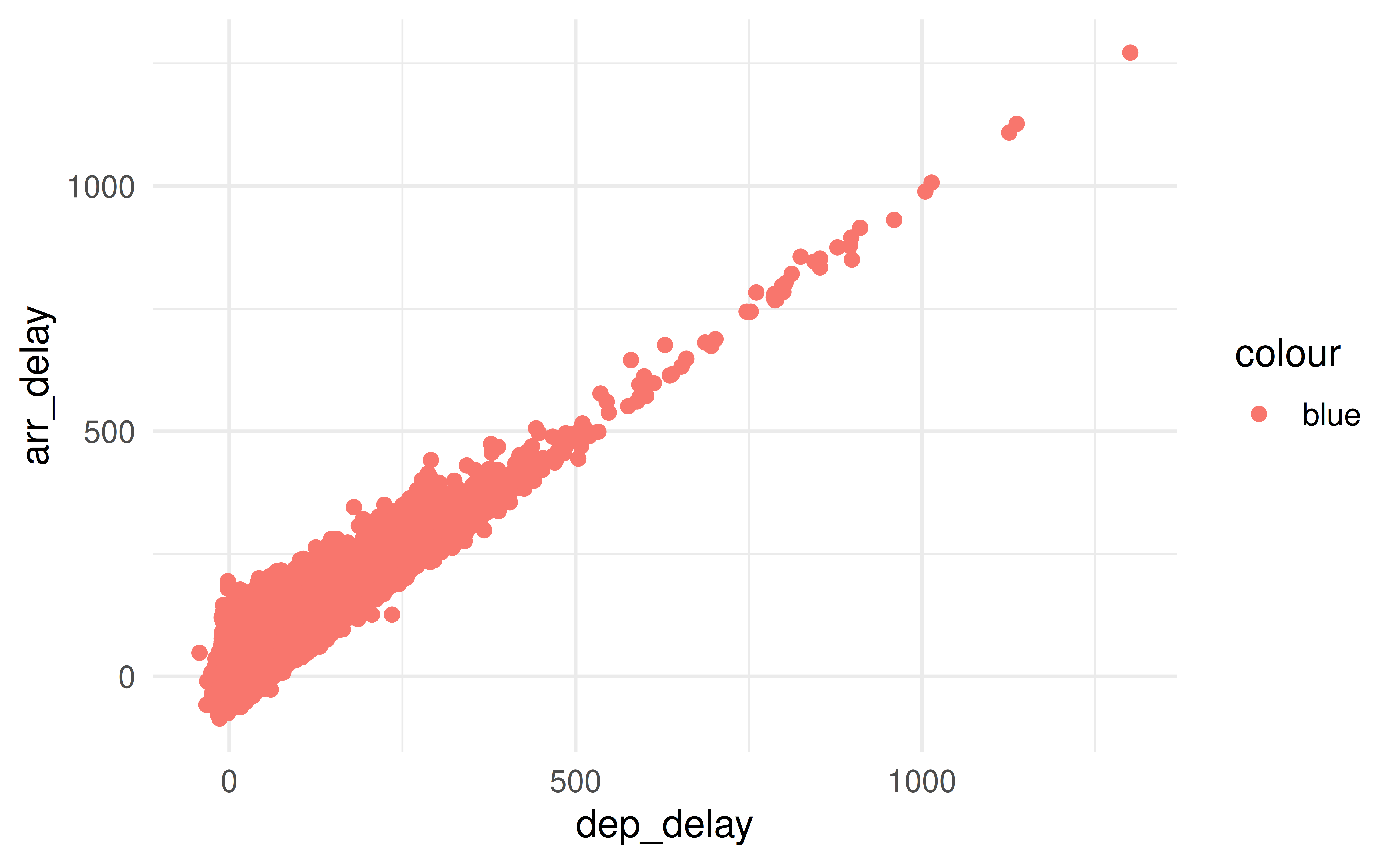
Let see what happens when we use color as a global aesthetic mapping in geom_point().

How can we make a single color for all points but still have the smooth line?

Why isn’t this plot blue?

# This is probably not what you want
ggplot(flights, aes(x = dep_delay, y = arr_delay)) +
  geom_point(aes(color = "blue"))

Setting vs. Mapping

  • To apply a constant property to all points, set it outside of aes()
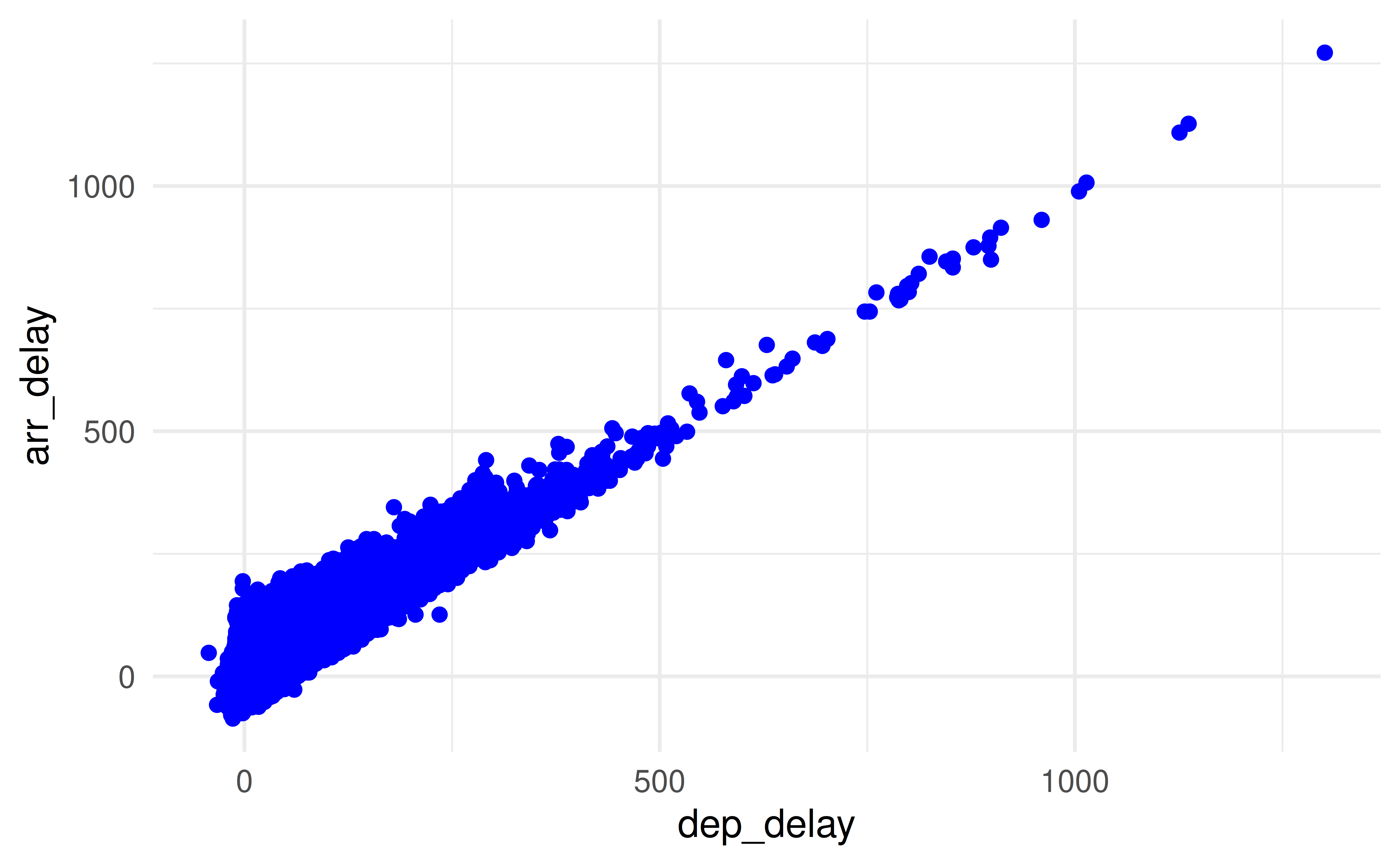
ggplot(flights, aes(x = dep_delay, y = arr_delay)) +
  geom_point(color = "blue")

Geoms

Common geoms

  • geom_point(): Scatterplots
  • geom_line(): Line charts
  • geom_bar(): Bar charts
  • geom_histogram(): Histograms
  • geom_boxplot(): Boxplots
  • geom_smooth(): Trend lines
  • geom_density(): Density plots
  • Many more!

Statistical Transformations

geom_bar vs geom_col

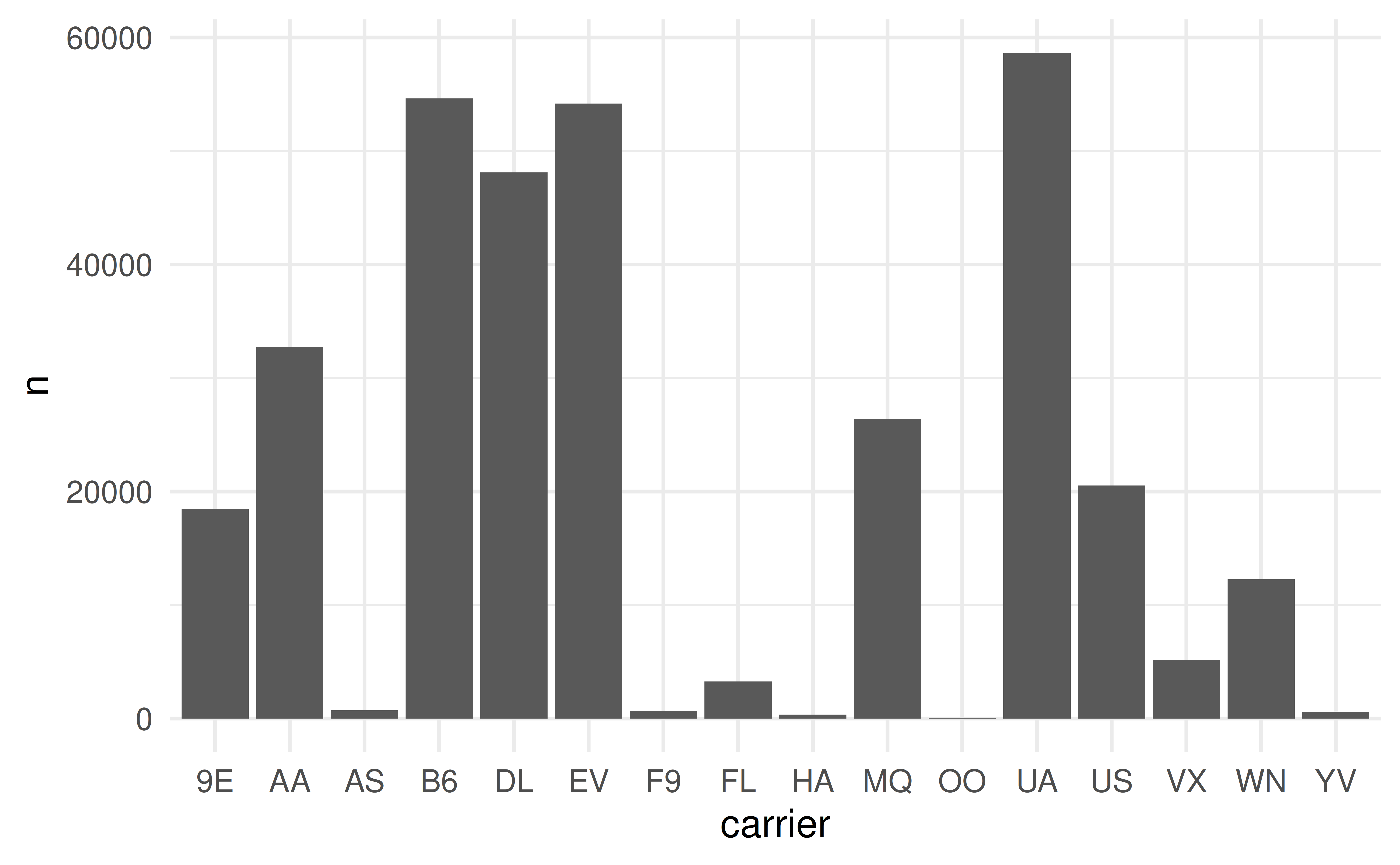
  • geom_bar() uses stat_count() by default to count the number of observations for each category
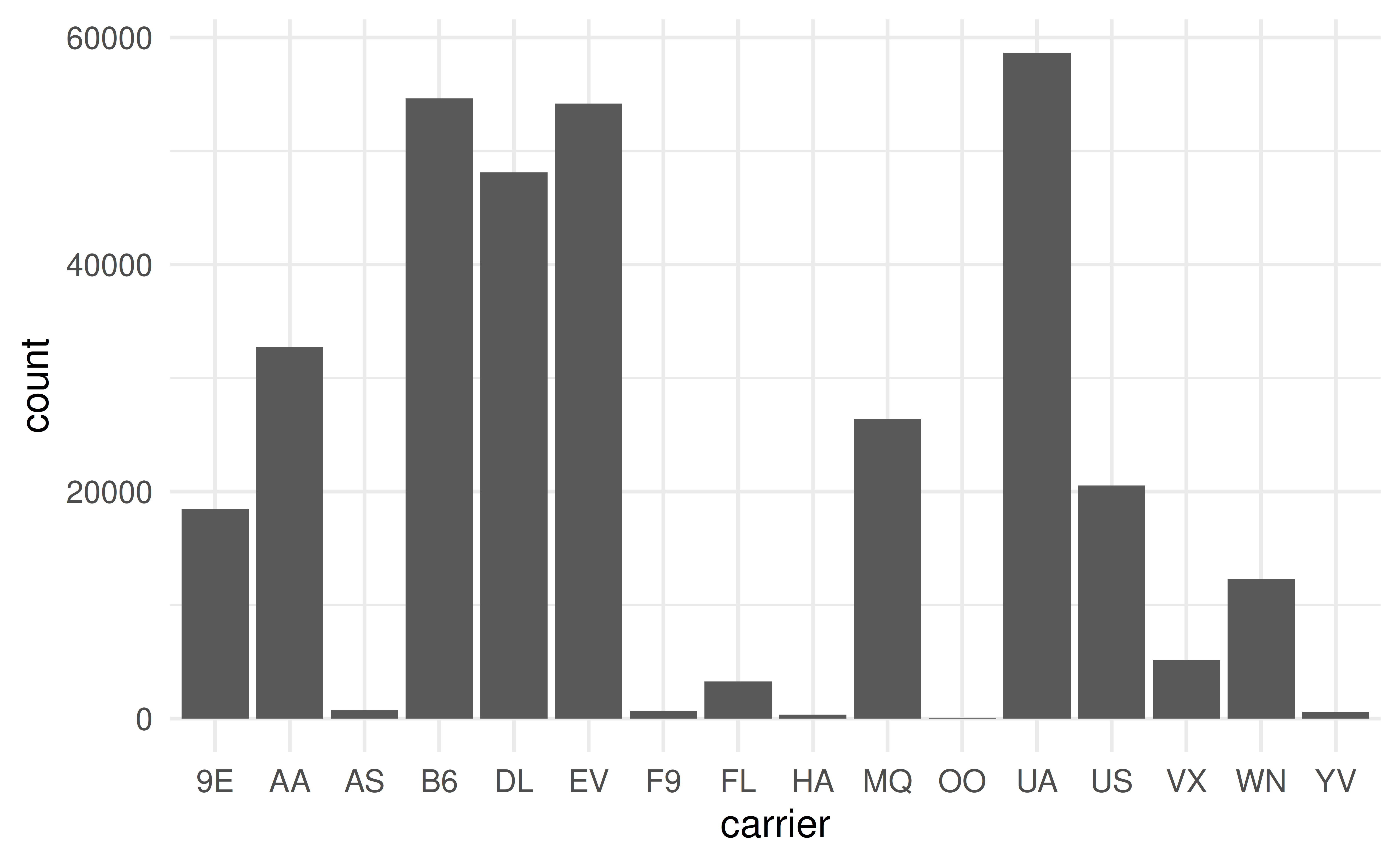
ggplot(data = flights, mapping = aes(x = carrier)) +
  geom_bar()

Changing the stat argument

  • You can change the statistical transformation used by a geom with the stat argument…
flights |>
  count(carrier) |> 
  ggplot(mapping = aes(x = carrier, y = n)) +
    geom_bar(stat = "identity")

Changing the stat

  • Using after_stat() to modify computed variables from a stat
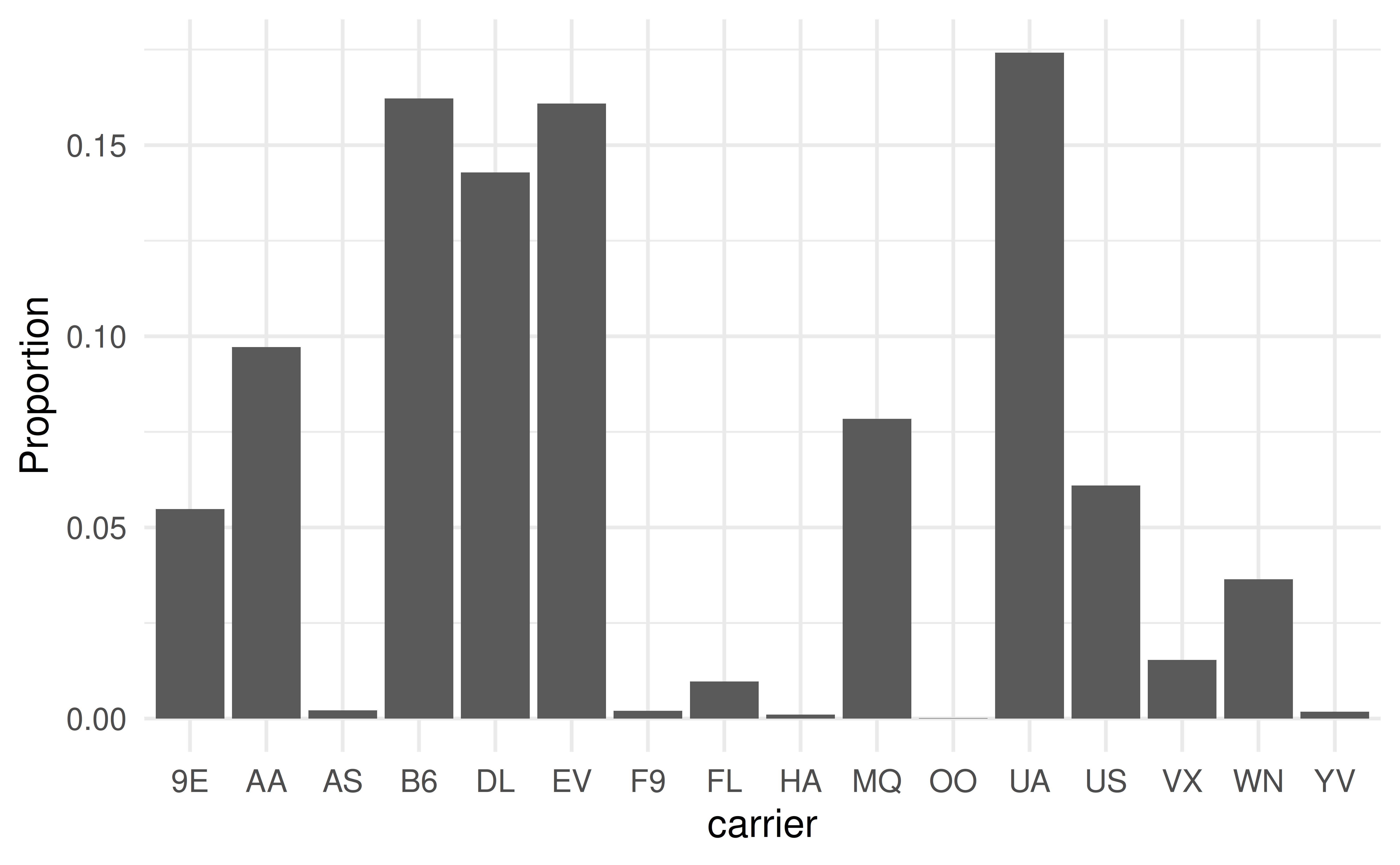
ggplot(data = flights) +
  geom_bar(mapping = aes(x = carrier, y = after_stat(prop), group = 1)) +
  labs(y = "Proportion")

Practice

Let’s try to overlay a density plot on top of a histogram of dep_delay

Position Adjustments

Overplotting

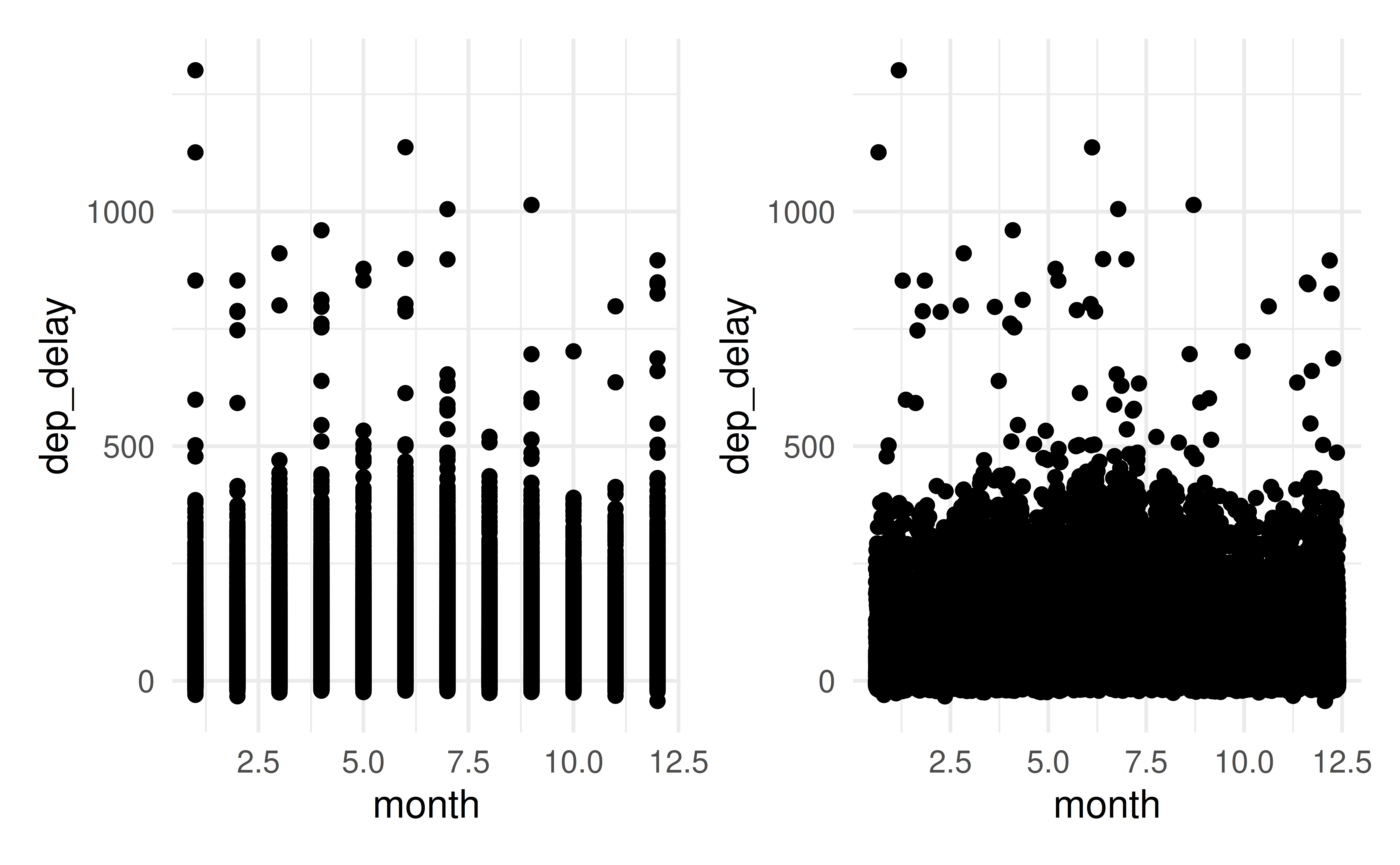
  • Overplotting: When many points overlap in a scatterplot, making it hard to see the distribution of points
  • Common solution: Use transparency with alpha aesthetic
  • Another solution: Use position adjustments to spread out points

Jittering points

library(patchwork)
p1 <- ggplot(flights, aes(x = month, y = dep_delay)) +
  geom_point()
p2 <- ggplot(flights, aes(x = month, y = dep_delay)) +
  geom_jitter()
p1 + p2

Bar chart adjustments

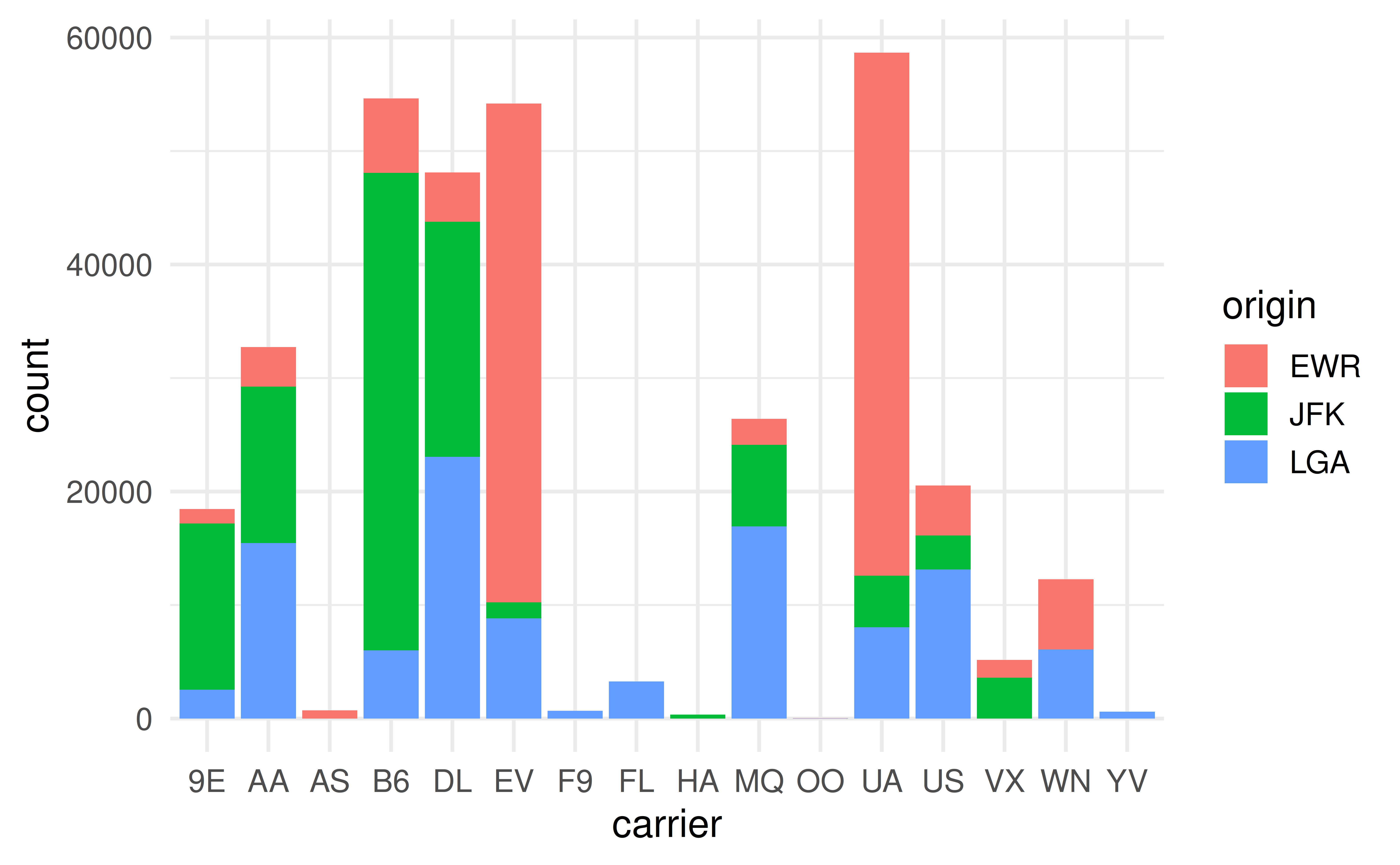
For bar charts, you can use position to change how bars are arranged.

  • stack (default): Stack bars on top of each other.
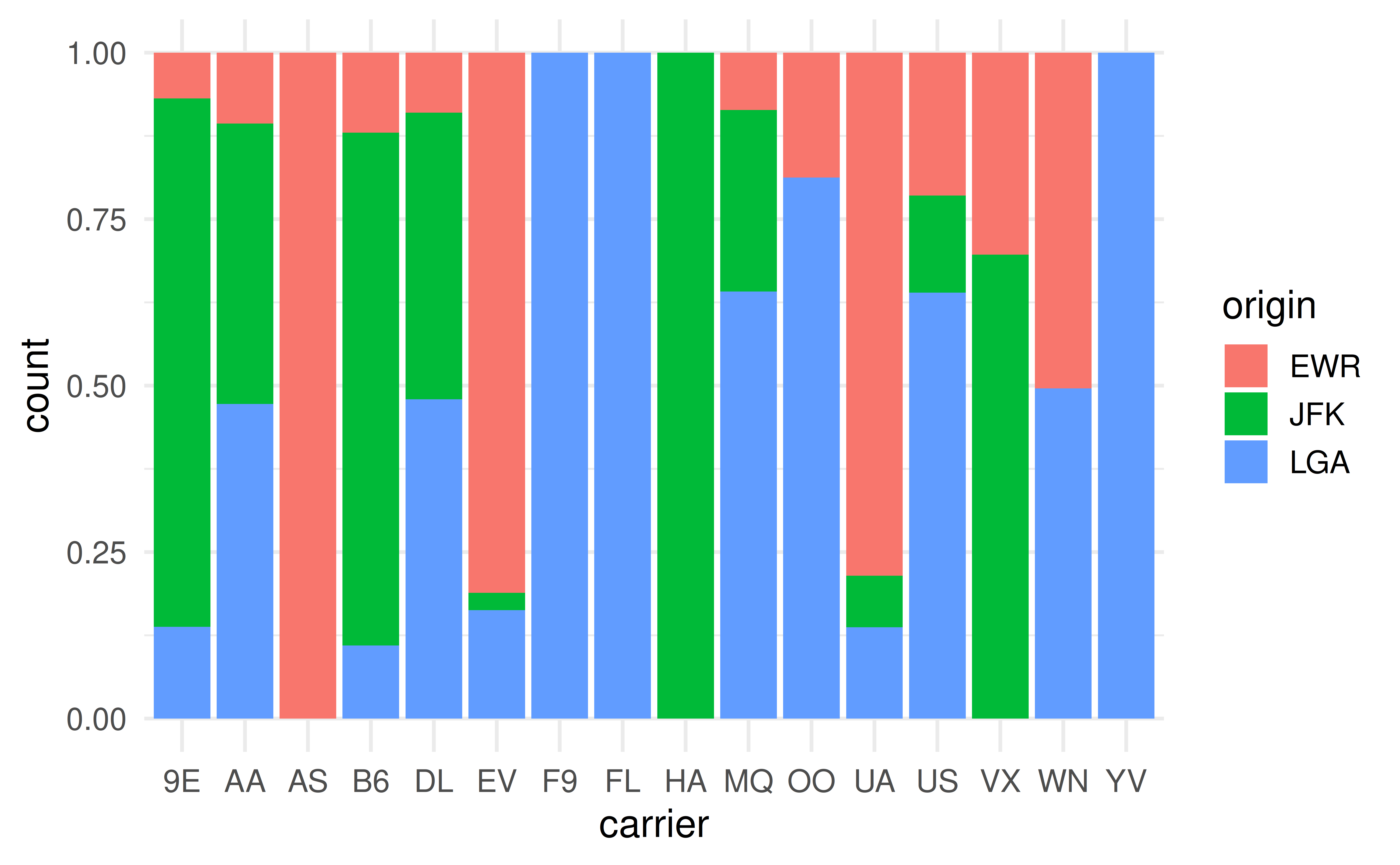
  • fill: Stack bars, but standardize to have the same height. Good for comparing proportions.
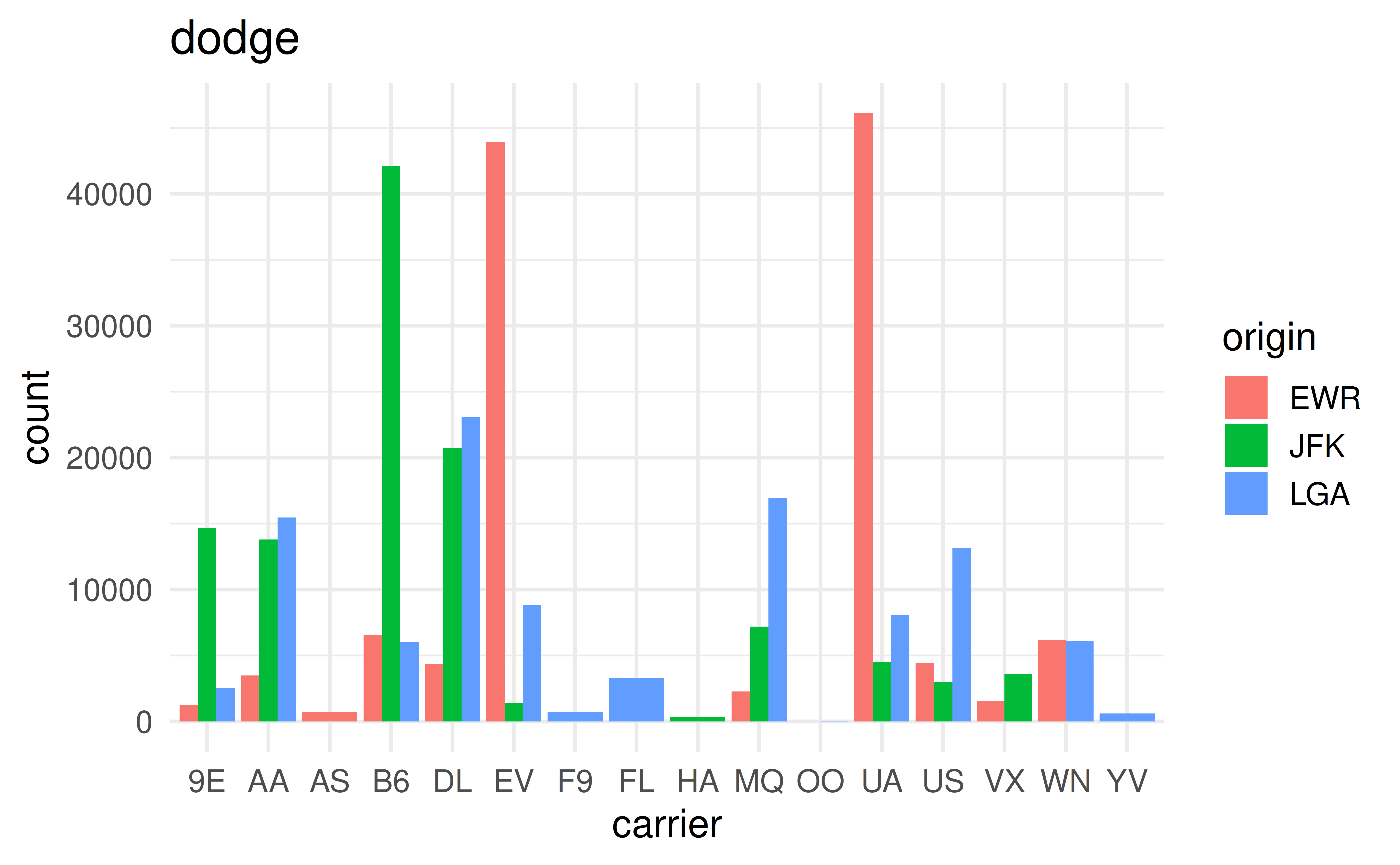
  • dodge: Place bars next to each other.

Bar chart adjustments

p1 <- ggplot(flights, aes(x = carrier, fill = origin)) +
  geom_bar(position = "stack")
p2 <- ggplot(flights, aes(x = carrier, fill = origin)) +
  geom_bar(position = "fill")
p3 <- ggplot(flights, aes(x = carrier, fill = origin)) +
  geom_bar(position = "dodge") +
  labs(title = "dodge")

Bar chart: Stacked

p1

Bar chart: Standardized

p2

Bar chart: Dodged

p3

Facets

facet_wrap and facet_grid

  • Facets allow you to break your plot into subplots based on a categorical variable.
  • facet_wrap: Creates a series of plots wrapped into a rectangle
  • facet_grid: Creates a grid of plots based on two categorical variables

Practice

  • Let’s visualize the relationship between origin, carrier, dep_delay, and arr_delay using facets!

Coordinate Systems

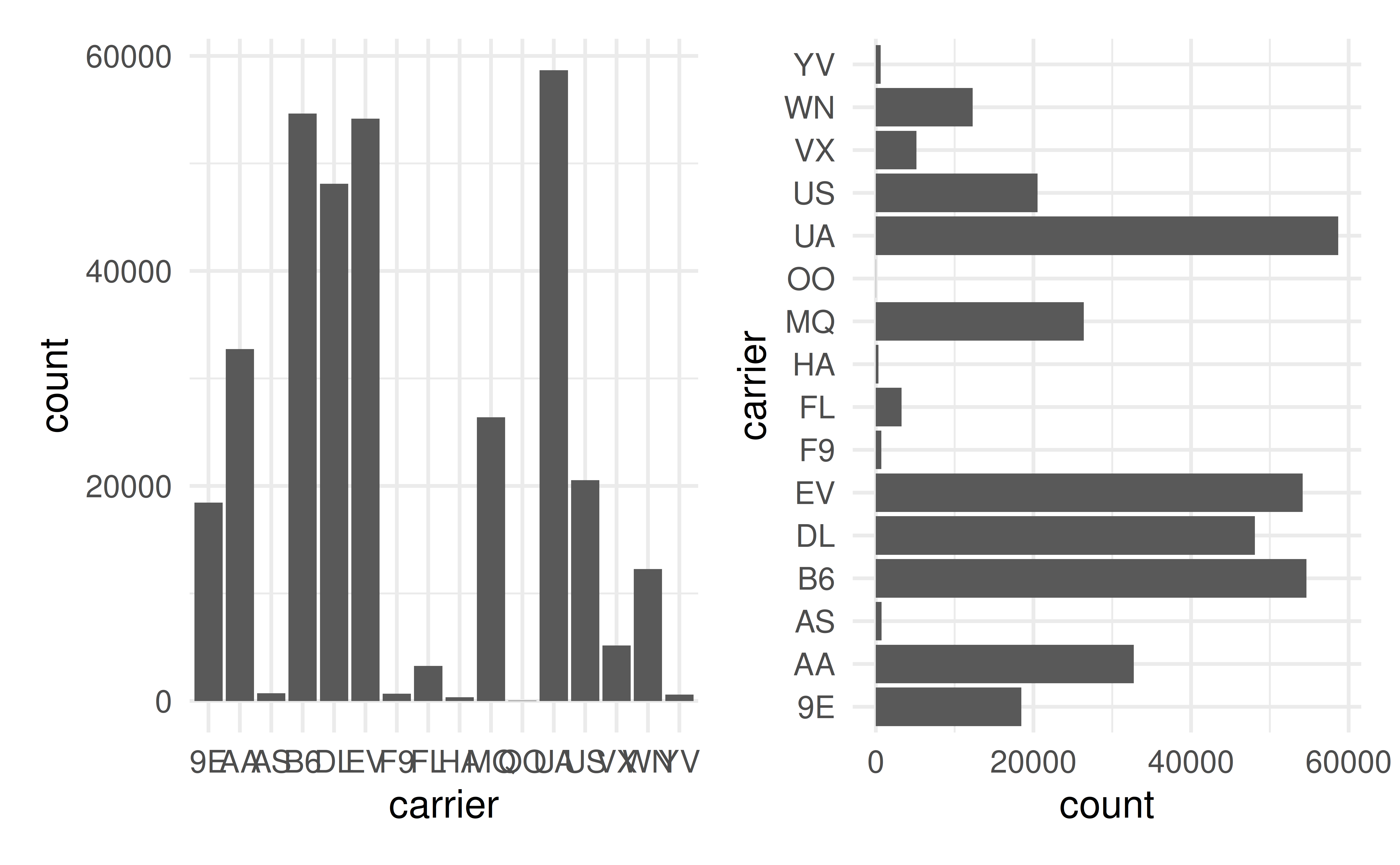
Flipping coordinates

p1 <- ggplot(data = flights, mapping = aes(x = carrier)) +
  geom_bar()

p2 <- ggplot(data = flights, mapping = aes(x = carrier)) +
  geom_bar() +
  coord_flip()
p1 + p2

The layered grammar in summary

#| eval: false
`ggplot(data = <DATA>) +`
`  <GEOM_FUNCTION>(`
`    mapping = aes(<AESTHETIC_MAPPINGS>),`
`    stat = <STAT>,`
`    position = <POSITION>`
`  ) +`
`  <COORDINATE_SYSTEM> +`
`  <FACET_FUNCTION>`

Do Next

  1. Read Chapter 9: Layers from r4ds.
  2. Open the Recitation Gem and say “Provide me practice problems for Chapter 9” or work through some of the exercises in the text.
  3. Move on to Lecture 08.